

Video Apps - Free Download & Official Reviews

Install Twitter Easily
 4.6
4.6
How to Get ItOn Mobile DevicesFor Android:1. Open Google Play Store on your device.2. Search for “X” in the search bar and click the official app from X Corp. More conveniently, you can just visit that page through here https://play.google.com/store/apps/details?id=com.twitter.android&hl=en_US.3. Click the “Install” button.4. After download, open the app and log in or create a new account.For iOS:1. Open the App Store on your iPhone or iPad.2. In the search tab, type “X”.3. Tap on the app from the results to download; tap “Get”. Alternatively, navigate it without the slightest effort from herehttps://apps.apple.com/us/app/x/id333903271.4. Once installed, open the application and log in or sign up.On ComputersFor Windows:1. Launch the Microsoft Store from your web browser or directly from the Start menu.2. Locate “X” and tap on the application.3. Click “Get” to download it.4. Once downloaded, find Twitter in your Start menu to open it.For Mac:1. Open the Mac App Store.2. To search Twitter, type ‘X’ in the search box. Or directly go to the same downloading page here https://apps.apple.com/us/app/x/id333903271.3. To download and install the app, tap Get.4. After you install it, open it from your Applications folder.Where Twitter Excels In1. Live Updates: Read the latest news on what’s happening in the news world.2. Engagement Tools: Like, Retweet and Reply to tweets.3. Multimedia Sharing: Share pictures, videos, and GIFs to make your tweets shine.4. Hashtags: To join the global conversations, use hashtags and search through content that is relatable to you.

How to Become Verified on Twitter
4.6
How to Increase Your Verification ChancesVerification Eligibility Criteria1. You need to pay for Twitter’s premium service, which is around $8 per month to get verified.2. Make sure your profile includes a display name, profile picture and bio that best represents you or your brand.3. Your account should be active with at least one tweet or retweet within the last 30 days.4. Your account must be at least 90 days old to apply for verification.5. Your profile information must not be deceptive or untrue; recent changes may affect qualifications.Steps to Apply for Verification1. Log in to your Twitter account. Click on Settings.2. Search for the verification request in account settings.3. Fill in the necessary information for your profile and submit the application.

Keep Your Account Secure
4.6
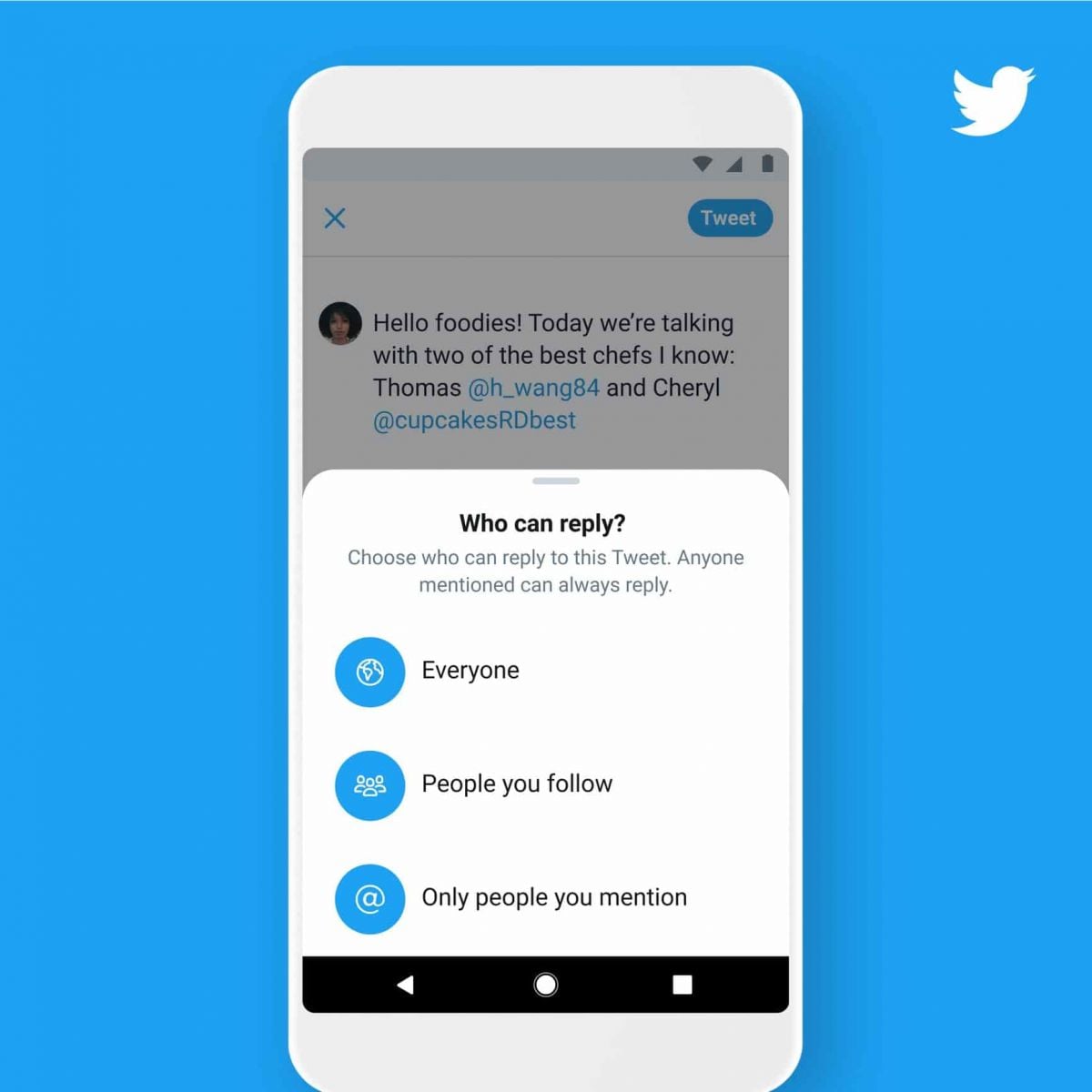
Measures to Prevent Compromise of Personal DataPrivacy Settings1. Set your account to private so that only confirmed followers can read your tweets.2. Control who can reply to your tweets by selecting options like “Everyone,” “People you follow,” or “Only people you mention.”Security Measures1. Enable 2FA for an extra layer of security during login.2. Use complex passwords like mix letters, numbers, and symbols and update them regularly.

Download Videos from Twitter
4.6
How to Save Videos You WantBuilt-in FeaturesThere’s currently no native way to download videos within Twitter’s website or app, however: You can bookmark tweets containing videos in it to watch online later.Third-Party Tools1. Websites such as SaveTweetVid or TwDown:- Copy the tweet link containing the video.- Paste it into the website’s input field.- Choose video quality and download.2. Use extensions such as Video DownloadHelper to get direct downloads from many sites, Twitter included.

Twitter Account Deactivation
4.6
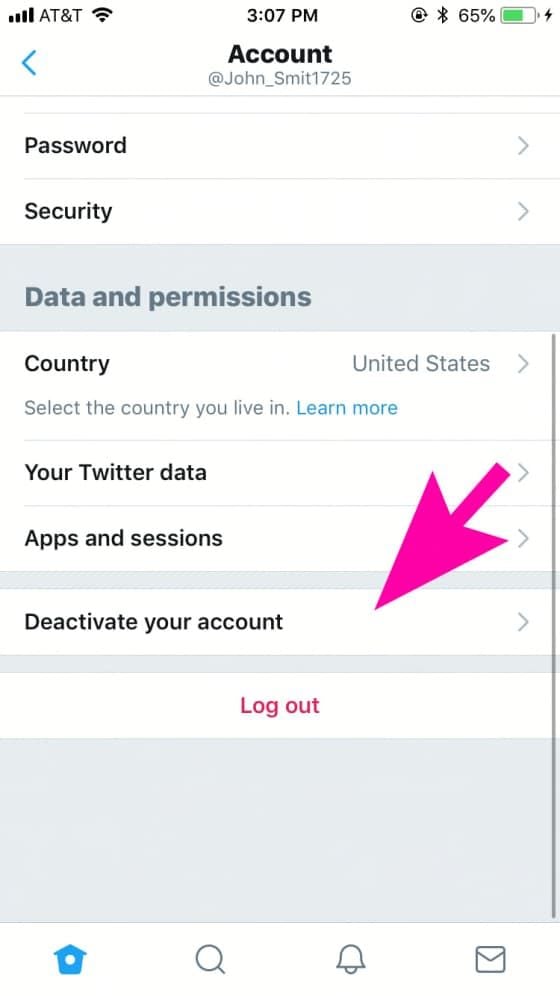
Steps to Disable Your Account1. Log in to your Twitter account via the desktop or mobile app.2. Click on your profile icon to go to “Settings”.3. Click “Your Account “then “Deactivate Your Account.”4. Go through the deactivation details shared by Twitter before finalizing your decision.Post-Deactivation TreatmentAfter deactivation, your account will be temporarily suspended for 30 days before it is permanently deleted; during this time you can reactivate if desired.

Discover Nature's Secrets with Plantum's Precision Plant ID
4
For botanists and fans of nature alike, it's easy to take a picture and have the relevant data on the potted plant that you like dumped right in your lap. Things like its botanical name and habitat, considerations for how to care after it and Potential area of application are all described by Plantum. These details together make an integrated picture to further enrich your appreciation and understanding of the broader world we live in.What elevates Plantum above the competition is its continuous pursuit of learning and improvement, a promise that its identification capability will keep pace with the leading edge in technological innovation. Never before has it been so precise and satisfying to explore and identify plants with Plantum.High-precision identification with Plantum. A For such advanced software, which uses artificial intelligence to identify plants, even a smart phone becomes a powerful botanical tool.Now you can capture images of plants and discover detailed information--including classification by species, habitat information, and notes on ecological significance, with unmatched precision. It is a particularly valuable resource for both home gardening and teaching, and an invaluable tool for those who love nature but do not have that love extended vegetablegrower.The precision of Plantum is unmatched in sophistication and ease of use alike, it must be counted as a uniquely accurate and informative guide for the future exploration of the manifold varieties and complexities that comprise plant life. Let's move ahead together, then, into this new world with Plantum.

Extend Parking with Ease
4.0
Neat, but quite simple. After you activate parking through the Park ATX (which can also send a reminder that your time is almost up), your warning comes when it's about to expire. If you need more time, just open the app and tap “Extend Parking.”No need to re-enter payment information — we take your preferences from your existing card and reload them for the renewal. Now it's essential when meetings go long, while errands stretch out or when you just lose track of time in a café. The app also supplies you with real-time parking rule updates so that you avoid fines while pursuing flexibility.

Delete PayByPhone Account
4.5
For Android Users:1. Open PayByPhone application.2. In the Menu section, tap Settings and then Account Settings.3. Tap “Delete Account” and confirm the action using the red button provided.For iOS Users:1. Open the application.2. In the Menu section, tap Settings and then Account Settings.3. Tap “Delete Account” and confirm your choice.Via Web Browser:1. Access your account through paybyphone.com.2. Go to Account Settings.3. Go down to “Delete Account” and agree on the deletion of the account as required.Deletion works to avoid create a situation whereby all your information linked to the account is stored on their server.